letmesee: event photo sharing
- 4.1
- Rating
- 100.00K
- Installs
- Free
- Price

 Analysis by App-foxy
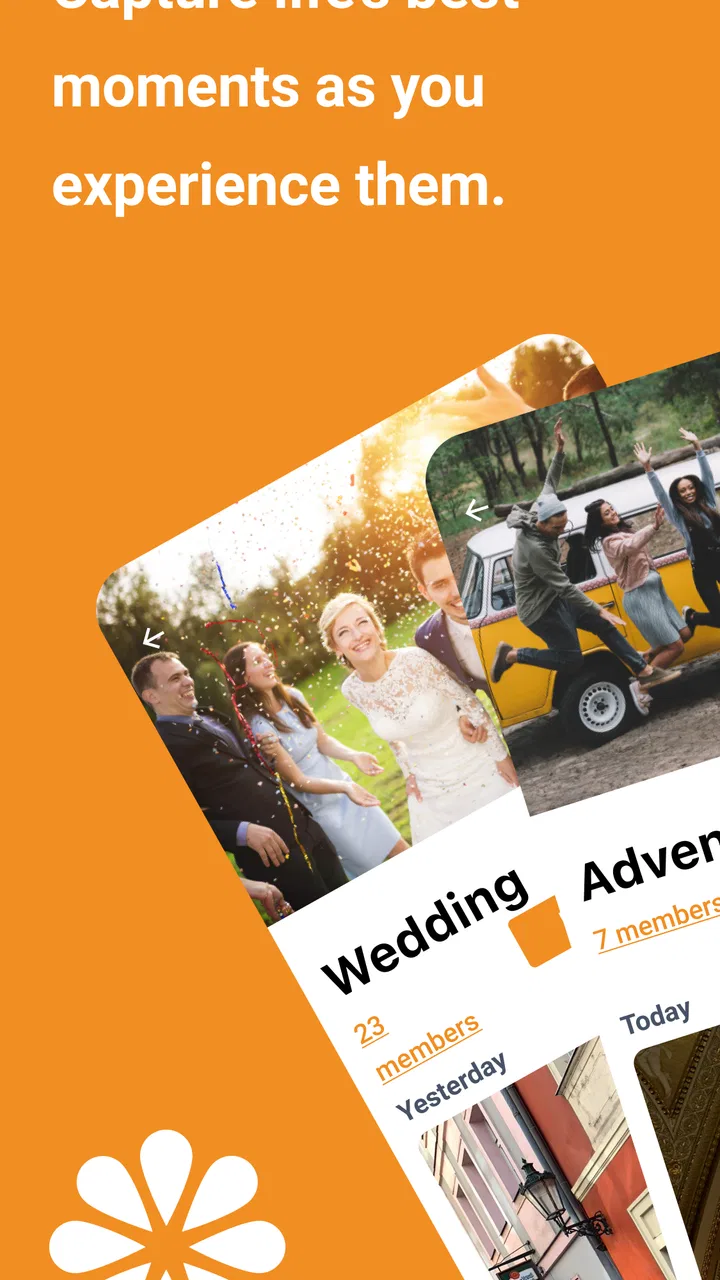
Sharing photos from an event usually sounds simple until the event is over. One person has the clearest group shot, another has the funniest video, and several guests leave with files scattered across private messages. letmesee is an Events app from AXEL Network that focuses on bringing those moments together in a more private, event-centered space. I found its appeal less in being a general social network and more in giving a specific gathering somewhere to collect photos and videos.
The app is free to install, carries a Teen content rating, and is available on devices running Android 6.0 or later. Its current version is 2.1.9. The service has passed the early-experiment stage: it has more than one hundred thousand installs, with a 4.1 average from roughly five hundred ratings. That does not guarantee that every event will feel equally active, but it does suggest that the basic idea has found a real audience.
What to expect before your first event
My first impression is that letmesee makes most sense when several people need to contribute to the same occasion without turning the whole process into a public social feed. Think of a birthday gathering, school activity, family reunion, sports day, or small community event. The useful unit is not an individual post; it is the shared collection around the event.
You May Also Like

 Blood Strike: 2.5 Anniversary
Blood Strike’s Loadouts Turn Every Drop Into a Tactical Gamble
A close look at Blood Strike’s custom loadouts: how fast access to signature weapons reshapes its battle royale rhythm, rewards preparation, and narrows the gap between fights.

 Pandora - Music & Podcasts
Pandora’s Music Is Easy to Start, but Harder to Recover
Pandora’s strength is its low-effort path from a seed to a station. Its weak spot is how much confidence it asks you to place in connection, setup, and quiet recovery.

 8 Ball Pool
 Is Built on Rivalries, Rematches, and Routine
A close look at the rivalries, rematches, shared routines, and unanswered safety questions that turn a quick pool match into a persistent mobile community.

 Samsung Music
’s Quiet Strength Is Playing What You Already Own
Its reach comes less from spectacle than from dependable access to a personal library. That simplicity is both the app’s strongest retention engine and its ceiling.

 AccuWeather: Weather Radar
AccuWeather Review: A Quick, Clear Forecast for Everyday Decisions
For everyday plans, the best forecast is the one you can understand quickly. AccuWeather makes rain timing, radar, and local conditions easy to act on, with a few trade-offs.

 Hill Climb Racing
Why Hill Climb Racing Still Turns Crashes Into One More Run
A tiny car, a bumpy hill and one more upgrade: Hill Climb Racing keeps resurfacing because its simple chaos makes every near-miss feel personal.
More From Our News Desk



That distinction matters when choosing between this app and familiar alternatives. A messaging group is convenient, but photos can disappear into conversation, videos may be compressed, and late arrivals have to search through old messages. A mainstream social network is easy for people who already use it, but it may expose the event to a wider audience than everyone wants. Cloud folders are better for long-term file storage, yet they can feel formal and require more organization from the person creating them.
letmesee sits between those choices. It is more focused than a chat and less like a permanent public profile. In my experience, that makes it attractive for guests who want to contribute quickly without learning a complicated media-management system. The trade-off is that its usefulness depends heavily on participation. If only the organizer uploads material, the shared experience will feel much thinner.
The app’s store summary describes a fun, easy and private way to share event photos and videos, and that is the right expectation to bring to it. I would not install it expecting a full photo editor, a replacement for a general backup service, or a social platform with endless discovery. Its value is concentrated around a particular event and the people connected to it.
The best fit for small, shared moments
I would recommend trying it when the event has a clear group identity and several attendees are likely to take pictures. It is especially useful when the organizer wants guests to contribute from their own phones instead of collecting files manually afterward. A wedding guest, for example, can capture a candid moment that the official photographer misses, while another guest records a short clip from a completely different angle.
There is also a practical benefit for people who dislike posting personal moments publicly. Keeping an event-focused space can reduce the pressure to choose a polished caption, crop every image, or decide whether a post belongs on a public profile. The app’s private positioning is one of its strongest reasons to consider it, although I would still be thoughtful about what I share and with whom.
On the other hand, I would skip it for a one-person photo archive or for a large public campaign where reach matters more than privacy. If your main goal is automatic backup across all your devices, a dedicated cloud-photo service is likely a better tool. If your group already has an active chat and only needs to send a couple of pictures, asking everyone to use a separate event app may add unnecessary friction.
Getting started without overcomplicating the setup
The first-time experience should be approached with one simple goal: create or join the right event before worrying about filling it with media. I recommend installing the app before the gathering rather than during it. That gives you time to understand the opening screens, check that your device meets the Android requirement, and avoid making the first few minutes of the event feel like technical support.
When you open it, take a moment to identify whether you are organizing an event or participating in one. That sounds obvious, but it is an important distinction in any shared-media app. The organizer needs to think about the event’s identity and who should be invited; a guest mainly needs a reliable path into the correct space. Mixing those roles can lead to duplicate event areas or people uploading to the wrong place.
My practical advice is to prepare the event name so it is immediately recognizable. “Saturday” is easy to forget if several gatherings are happening, while a name that combines the occasion and its date or location is easier for guests to identify. I am not treating that as a required format; it is simply a small organizational habit that prevents confusion when invitations are shared close together.
Before sending the invitation or access details, decide who genuinely needs access. A private event works best when the audience is intentional. For a family gathering, that may include relatives who attended and a few people who helped organize it. For a school or club activity, the organizer may want to explain the purpose clearly so participants understand why they are joining and what kind of media belongs there.
I would also tell guests what to do before they arrive: install the app, join the event, and test the basic contribution flow with a harmless picture if necessary. This is one of the less obvious ways to improve the experience. The event itself is the worst time to discover that someone has joined the wrong space or does not understand where their media should go.
What the free download means in practice
letmesee is free to download, which makes it easier to suggest to a group without asking everyone to pay before trying it. There are in-app purchases ranging from $0.99 to $14.99 per item, so I would not promise guests that every possible function is included at no cost. The sensible approach is to begin with the free experience and only consider a purchase if the app presents a feature your particular event actually needs.
That pricing detail is worth mentioning to organizers who are planning for a group. Do not build the event around an assumption that one person’s purchase automatically changes what every participant can do. If an optional paid item appears, read its description and decide whether it benefits the organizer, the contributors, or the people viewing the collection. Keeping that decision separate from the invitation avoids awkward surprises.
The app is rated for teenagers, which makes it more suitable for many school, youth, and family settings than an adult-only service would be. Still, an age label is not a substitute for sensible supervision. Event organizers should explain the boundaries of the shared space, especially when younger participants are involved, and should avoid treating a private group as permission to upload anything without thought.
Reaching the first meaningful success
The first successful action should not be “invite everyone.” It should be getting one picture or video into the correct event and confirming that the collection feels understandable. I suggest starting with a photo that clearly belongs to the occasion, such as a group shot or a view of the venue. That gives the event an immediate visual anchor and makes it easier for the next person to recognize that they are in the right place.
Once that first item is present, invite one trusted participant before inviting the entire group. Ask that person to add a photo from their own phone. This small test checks the part that matters most: whether the event works as a shared space rather than just a personal upload area. It also reveals confusion early, when fixing it is simple and nobody has already contributed dozens of files.
At the event itself, I would encourage guests to contribute naturally rather than stopping every few minutes to manage the collection. A useful rhythm is to take pictures as usual, then add a small selection during a quiet moment. Uploading every near-identical frame can make the collection harder to enjoy later. The strongest shared albums usually benefit from a little judgment, particularly when several people photograph the same activity.
One of my favorite practical uses is the “different viewpoint” effect. At a birthday party, the host is often busy and misses the reactions around the room. Guests can supply those missing angles: the setup before everyone arrives, the moment the cake appears, or the conversation happening away from the main table. The app becomes more valuable when people contribute what the organizer could not see, rather than merely duplicating the official photos.
Videos need a little more discipline. Short clips can preserve atmosphere better than still images, but a collection filled with long, shaky recordings becomes tiring to browse. I recommend choosing clips that capture a distinct moment and adding them sparingly. That is not a restriction imposed by the app; it is a workflow choice that keeps the event collection enjoyable for people with limited time or mobile data.
Another non-obvious tip is to make the first contribution early, even if the event has barely begun. A blank event feels unfinished and gives guests no visual confirmation that they joined the correct place. One clear opening image acts like a signpost. Later, when people return to the collection, they can understand the event’s context without asking the organizer what they are looking at.
Where new users may become confused
The most likely confusion is not the act of taking a picture; it is knowing which event should receive it. This matters when an organizer creates a space in advance and guests receive several messages containing similar names or instructions. I would keep the invitation wording consistent and avoid creating multiple versions of the same event just because the first few people have not joined immediately.
A second source of friction is the difference between sharing an event and sharing a file directly with one person. New users may expect the app to behave like a private message thread, then wonder why their contribution belongs to the wider event group. Before uploading, I would pause and check the destination. That habit is particularly important for family occasions where some pictures are intended for everyone and others are meant for a smaller conversation.
Privacy also deserves a realistic explanation. An event-centered app can feel more private than a public social network, but “private” should not be interpreted as “nothing can ever be seen outside my intended audience.” People can still save, photograph, or redistribute media in their possession. I would only add pictures that I am comfortable sharing with the actual event participants, and I would respect anyone who does not want to appear in a contribution.
Another issue is expectation management after the event. Some users may assume that an event collection replaces a permanent backup. I would not rely on it as the only copy of important memories. After the gathering, keep valuable originals in your normal photo library or another storage method you trust. The app is at its best for gathering and revisiting event media, not for becoming the sole archive of irreplaceable files.
There can also be a social hesitation: guests may wait for someone else to contribute first. The organizer can solve this without pressuring anyone by adding a few representative images and explaining the purpose in one sentence. “Add the moments I missed” is more inviting than a vague request to “upload everything.” Clear prompts tend to produce more useful contributions and fewer duplicate files.
When another option is better
If your group already lives in a messaging app and the event is informal, the familiar option may win simply because nobody needs a new installation. That is a valid choice for a handful of images. letmesee becomes more compelling when the event has enough participants or media that a chat timeline starts to feel messy.
A shared cloud folder is preferable when file organization, long-term access, or original-file handling is the priority. It is also a better fit for a professional photographer delivering a structured set of images. In contrast, letmesee feels more natural for guests who want to participate quickly from their phones without learning folder permissions and naming conventions.
A public social network is the stronger choice when the goal is visibility, comments from a broad audience, or attracting people who were not at the event. I would choose letmesee when the opposite matters: keeping the experience centered on attendees and making the collection feel connected to a particular occasion. Neither approach is universally superior; they solve different sharing problems.
Turning one event into a smoother habit
After the first successful upload, the next step is to establish a simple contribution pattern. Tell guests whether you want candid moments, short videos, behind-the-scenes images, or a mixture. This gives the collection a character and prevents it from becoming a random pile of files. For recurring activities, such as club meetings or family celebrations, a consistent naming habit can also make older events easier to recognize.
I would assign one person to watch for practical issues without making them the sole photographer. Their role can be as simple as answering “which event do I join?” and reminding people to contribute when the moment is over. This is especially useful when the organizer is busy hosting. The app reduces collection work, but it does not remove the need for someone to provide basic direction.
For a larger gathering, consider a short announcement early on that explains the purpose of the event space and the kind of content welcome there. Then leave people alone to enjoy themselves. Constant reminders can make sharing feel like a chore, while one clear explanation plus a visible first contribution is often enough to get the collection moving.
When reviewing the finished event, I would look for variety rather than volume. A few images showing preparation, the main activity, and the quieter moments can tell the story better than a long sequence from one person’s viewpoint. This is a useful trade-off to communicate to guests: the app makes it easy to add media, but thoughtful selection is what makes the final collection worth revisiting.
My overall view is that letmesee succeeds when it stays focused on the social reality of an event: many people see different things, and everyone leaves with only part of the story. AXEL Network has built an app that is easy to understand at a glance, with a clear reason to exist beyond ordinary messaging. The 4.1 average and its growing install base make it a reasonable option to test, especially because the download is free.
I would recommend it to organizers who want a private-feeling, shared place for event photos and videos and who are willing to give guests a little direction at the start. I would be more cautious if your needs are professional delivery, automatic backup, public reach, or a tiny one-off exchange that a normal chat can handle. The app is not a universal replacement for every sharing tool, but for the right gathering, the first meaningful success is simple: one clear event, one useful contribution, and a group that can add the moments the organizer missed.
FAQs for letmesee: event photo sharing
01What is letmesee: event photo sharing, and how does it work?
letmesee is designed to help people collect and share photos from the same event in one private space. After creating or joining an event, participants can upload images so everyone in the group can view the memories together. It is useful for weddings, parties, trips, conferences, and family gatherings where photos are usually scattered across different phones and messaging apps.
02Do I need an account to use letmesee?
The exact sign-up requirements may depend on the current version of the app, but users should generally expect to provide basic information before creating or joining an event. An account or access code may be used to identify participants and keep event albums private. Before uploading personal photos, review the registration, invitation, and privacy screens so you understand what information is requested.
03Who can see the photos uploaded to an event?
Photos are typically intended for the people invited to or approved for a specific event rather than for the general public. However, privacy depends on how the event is created and shared, including invitation links, codes, or participant permissions. Avoid posting sensitive images until you have checked the event’s visibility settings and confirmed that only the intended guests can access the album.
04Can I download, save, or share photos from letmesee?
The app’s main purpose is to make event photos available to the group, and many users will want to save their favorite images afterward. Available options can vary by device, app version, and event permissions. Look for download or sharing controls when viewing a photo, and remember that downloading another person’s image should be done respectfully and with the photographer’s or subject’s permission.
05Is letmesee free to download and use?
letmesee may be available to download without an upfront charge, but the overall experience can depend on the provider’s current pricing model. Some features, storage limits, premium tools, or event services may require payment, while others may remain free. Check the Google Play Store or Apple App Store listing before installing to confirm pricing, subscriptions, in-app purchases, and supported devices.
Pros
- Private event albums keep shared photos limited to invited guests.
- Guests can upload pictures without needing advanced editing skills.
- Useful for weddings
- parties
- trips
- and other group occasions.
- Collects photos from multiple attendees in one organized place.
- Sharing memories is more convenient than managing long chat threads.
Cons
- The app is less useful when few guests actively upload photos.
- Photo quality may vary depending on each guest’s phone and settings.
- Some features may require account creation or event invitations.
- Large event albums can become difficult to browse over time.
- Privacy depends on how carefully invitations and sharing links are managed.

letmesee: event photo sharing
Gallery